UPDATE!
Crossed words in this article are supposed to be treated as false, please ignore them!
Read more about this here in an updated article!
Watch out for this option when you’re purchasing games on Steam:
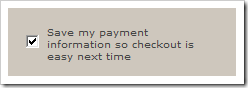
If you have selected this option Steam will remember your security code you provided earlier – I did not agree to remember this code – and right after you “Buy” a game by clicking the proper button you won’t be prompted if you want to use PayPal, VISA (or any other payment method) and you will buy any game instantly. Best way to check this is to buy any random DLC for a game you don’t own and you will see that it will try to purchase the game automatically.
We encourage you to send a support ticket to Valve to make this optional to remember the security code. You can use this pre-made e-mail message:
Hello!
I am concerned that Steam Store saved my credit card’s security code on an external server after I selected “Save my payment information so checkout is easy next time”. In the past this option only saved my name, address, phone number and still asked me about credit card number, security code and it’s validity.
Also by selecting this option Steam Store prevented me from chosing other payment methods than VISA.
Please make this optional and do not save my credentials next time (but save my name, address etc – just like it was before).
Thank you for your help,
XXX
Update #1:
Sure you can remove your details from My Account section in the store but that is not the point. Steam shouldn’t remember expiration date, security code and the card number itself.
Update #2:
Thanks to our friend ld13 we managed to find interesting information from VISA’s website:
Avoid CVV2 Storage. All merchants are prohibited from storing CVV2 data. When asking a cardholder for CVV2, merchants must not document this information on any kind of paper order form or store it on any database.
Source: http://usa.visa.com/download/merchants/rules_for_visa_merchants.pdf (Page 12)
CVV2 storage. The Visa U.S.A. Inc. Operating Regulations prohibit merchants and/or their agents from storing the Card Verification Value 2 data (security code printed within or immediately to the right of the signature panel) after transaction authorization.
Source: http://usa.visa.com/download/merchants/rules_for_visa_merchants.pdf (Page 60)
Card Verification Value 2 (CVV2)
A Visa fraud prevention system used in card-not-present transactions to ensure that the card is valid. The CVV2 is the three-digit value that is printed on the back of all Visa cards. Card-not-present merchants ask the customer for the CVV2 and submit it as part of their authorization request. For information security purposes, merchants are prohibited from storing CVV2 data.
Source: http://usa.visa.com/download/merchants/rules_for_visa_merchants.pdf (Page 130)
Comments
21 responses to “(Updated) Steam will remember your security code!”
Got answer from support with the pre-made question now:
—
Hello,
A staff member has replied to your question:
Hello Robert, Thank you for contacting Steam Support. To remove your credit card details from your Steam account:
– Log in to your Steam account and click on the “Store” Tab. – In the upper right hand corner, click on the “your account” link. – Under “Payment method” you will see your card type and the last 4 digits of the card that was saved.
Click the “Delete” link, to remove this information from your Steam account.
NOTE: If you do not see a “Payment method” section above “Licenses and subscriptions”, this means that your credit card information is not stored.
The next time you complete a purchase, you will need to enter your credit card information. If you do not want your credit card information saved, uncheck the box that says “Save my payment information so checkout is easy next time ”. Please let us know if you have any questions, or if you encounter any further difficulty.
—